It's hard not to be an Apple enthusiast, when they seem to think of things ahead of time. For those of you who are upgrading from your original iPhone to iPhone 3GS, you'll be happy to know that your original iPhone is still usable after you've moved your AT&T cellular service over to the new iPhone. Here's the instructions from Apple:
http://support.apple.com/kb/HT3406
Good luck and happy computing.
Friday, June 19, 2009

Thursday, June 18, 2009
RANTS: Finally, Active Directory Users and Computers for Vista
It sure took MS a long time to get this out, considering Server 2008 has been available for awhile. In any case, I'm installing it now and am excited to finally be able to administer from my Vista box, though I'll probably be upgrading to Win7 soon.
Here's the official MS link:
http://support.microsoft.com/kb/941314
Here's the official MS link:
http://support.microsoft.com/kb/941314
Wednesday, June 17, 2009
TIPS & TRICKS: How To Stop iTunes From Launching When iPhone Is Plugged In
The iPhone battery leaves me wanting more. Some day we won't even worry about battery life. For now, I find that I have to charge pretty regularly. I don't think I can get through a full day of pretty regular usage without charging. Because of the short battery life, I always keep the charging cable with me. However, I don't keep the USB to AC adapter with me. Usually, I'm near a computer with a USB port to help charge the iPhone.
In this process, one minor annoyance is that iTunes insists on launching when the iPhone is plugged in. Since, I don't always plug into the same machine that I normally sync with, I wanted to find a way to keep iTunes from launching when I plug into other machines for charging purposes. Googled it and couldn't find a quick answer.
Here's the simple way to do it. Remove the iTunes Helper application from running on startup. In Mac OS X, go to System Preferences > Accounts > Your User Account > Login Items and remove the iTunes Helper Application. The next time you login to your profile and plug in your iPhone, iTunes will not launch. I haven't tried it on a Windows machine yet, but I know that there is an iTunes Helper Application there too. Just remove it and iTunes will not launch.
Hope this helps with this slightly annoying problem. Happy computing.
In this process, one minor annoyance is that iTunes insists on launching when the iPhone is plugged in. Since, I don't always plug into the same machine that I normally sync with, I wanted to find a way to keep iTunes from launching when I plug into other machines for charging purposes. Googled it and couldn't find a quick answer.
Here's the simple way to do it. Remove the iTunes Helper application from running on startup. In Mac OS X, go to System Preferences > Accounts > Your User Account > Login Items and remove the iTunes Helper Application. The next time you login to your profile and plug in your iPhone, iTunes will not launch. I haven't tried it on a Windows machine yet, but I know that there is an iTunes Helper Application there too. Just remove it and iTunes will not launch.
Hope this helps with this slightly annoying problem. Happy computing.
Wednesday, June 03, 2009
RAVES: Social Networking for Enterprise
The explosion of social networking sites has been incredible. Facebook, Twitter, LinkedIn, etc all have people updating themselves in one way or another. However, in the enterprise environment, I'm tasked with the duty of keeping data, content and IP safe. This goal and public social networking sites do not go well together.
Enter enterprise-level business networking sites. I just finished reading the eWeek article reviewing 3 potential solutions: Socialcast, Socialtext, and Huddle. We are seriously considering our options for capturing, processing, and presenting different types of videos. In reading the article, I kept an eye out for these sites to include video. Not much to be said, but the video aspect may be something that draws us into SAAS (Software As A Service) solution.
At the end of the day, our users are becoming more savvy. The way they handle personal business will easily carry over to work-related business and make them more productive if we provide the tools to do it.
More to come, I'm sure. Happy computing.
Enter enterprise-level business networking sites. I just finished reading the eWeek article reviewing 3 potential solutions: Socialcast, Socialtext, and Huddle. We are seriously considering our options for capturing, processing, and presenting different types of videos. In reading the article, I kept an eye out for these sites to include video. Not much to be said, but the video aspect may be something that draws us into SAAS (Software As A Service) solution.
At the end of the day, our users are becoming more savvy. The way they handle personal business will easily carry over to work-related business and make them more productive if we provide the tools to do it.
More to come, I'm sure. Happy computing.
Monday, May 11, 2009
RANTS: Hackers Turn to Extortion
http://www.theregister.co.uk/2009/05/05/virginia_medical_records_extortion/
On or offline, there are plenty of people out there who want to take advantage because of greed. This is no different. I bring this up to continue to illustrate that security is not a confined job of your friendly neighborhood IT person. We all have a part in this process by having strong passwords, not sharing our passwords, and not letting anyone use our computers, among other things. Let's face it, as we become more connected in this online world, the tools that make work easy for us also make it easy for those who seek to do us harm.
Moral of the story? Don't plan to make every part of your online life easy. Some complexity is good.
Happy (and safe) computing.
On or offline, there are plenty of people out there who want to take advantage because of greed. This is no different. I bring this up to continue to illustrate that security is not a confined job of your friendly neighborhood IT person. We all have a part in this process by having strong passwords, not sharing our passwords, and not letting anyone use our computers, among other things. Let's face it, as we become more connected in this online world, the tools that make work easy for us also make it easy for those who seek to do us harm.
Moral of the story? Don't plan to make every part of your online life easy. Some complexity is good.
Happy (and safe) computing.
Thursday, April 30, 2009
RAVES: Print Greener and Make PDFs
I haven't yet tried this tool:
http://printgreener.com/
But, the motivation behind it is good. It doesn't seem that much different than a print preview, except that you can modify the print job further before hitting the actual printer AND it's a PDF creator, which means no need to go out and purchase Acrobat. I know Acrobat has lots of additional features, but most people only need basic PDF creation and this could be a good tool.
http://printgreener.com/
But, the motivation behind it is good. It doesn't seem that much different than a print preview, except that you can modify the print job further before hitting the actual printer AND it's a PDF creator, which means no need to go out and purchase Acrobat. I know Acrobat has lots of additional features, but most people only need basic PDF creation and this could be a good tool.
Tuesday, April 21, 2009
RANTS: OS X-targeted Malware is Increasing
http://www.f-secure.com/v-descs/trojan_osx_dnschanger.shtml
As Apple gains marketshare, malware for OS X is on the rise. Here's a quote from a recent email I received:
Please make sure to practice safe surfing. Remember, just because OS X has very few viruses that you've heard of, doesn't mean that your Mac is 100% safe. Nothing is 100%.
Happy "safe" computing.
As Apple gains marketshare, malware for OS X is on the rise. Here's a quote from a recent email I received:
About 35% of [some org] is OS X and 73% Windows yet [some org] has had _more_ OS X boxes infected with the DNS changer than Windows boxes.
Please make sure to practice safe surfing. Remember, just because OS X has very few viruses that you've heard of, doesn't mean that your Mac is 100% safe. Nothing is 100%.
Happy "safe" computing.
Thursday, April 16, 2009
TIPS & TRICKS: Binding OS X Leopard to Active Directory
I neglected to document how I successfully did it the first time around. In trying to retrace my steps, I started with this site:
http://www.makemacwork.com/bind-to-active-directory.htm
After following these steps, I was expecting the login screen of OS X to show blank fields for the username and password. However, I still saw the original list of users.
After poking around the settings a bit more, I realized that there were a couple settings that I changed when binding the machine to the AD the first time. After clicking on Bind... OS X asks for AD credentials that have permission to bind machines to the Active Directory. Just below the username and password fields there are a couple of check boxes that should be left checked. Here's what they should look like:
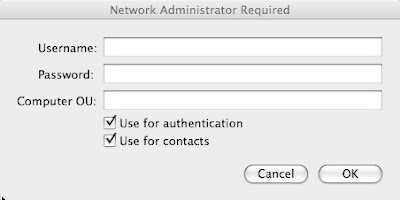
After I unbinded the machine and rebinded with those boxes checked, I was able to login to the machine with my AD credentials. NOTE: You might also be able to specify the directory domain on the Authentication server and contacts lists under Directory Utility > Search Policy without unbinding and rebinding. Just go to the Authentication tab click the plus button and check to see if the directory domain is listed. This can also be done with the contacts as well.
One other note, I would also go into System Preferences > Accounts > Login Options and change Display login window as: to Name and password for security and clarity that the user needs to provide their own username and password.
Happy computing...
http://www.makemacwork.com/bind-to-active-directory.htm
After following these steps, I was expecting the login screen of OS X to show blank fields for the username and password. However, I still saw the original list of users.
After poking around the settings a bit more, I realized that there were a couple settings that I changed when binding the machine to the AD the first time. After clicking on Bind... OS X asks for AD credentials that have permission to bind machines to the Active Directory. Just below the username and password fields there are a couple of check boxes that should be left checked. Here's what they should look like:

After I unbinded the machine and rebinded with those boxes checked, I was able to login to the machine with my AD credentials. NOTE: You might also be able to specify the directory domain on the Authentication server and contacts lists under Directory Utility > Search Policy without unbinding and rebinding. Just go to the Authentication tab click the plus button and check to see if the directory domain is listed. This can also be done with the contacts as well.
One other note, I would also go into System Preferences > Accounts > Login Options and change Display login window as: to Name and password for security and clarity that the user needs to provide their own username and password.
Happy computing...
TIPS & TRICKS: MacBook Pro, 3-Time Blinking Sleep Light on Startup
Symptom: Sleep light on MacBook Pro blinks 3 times quickly, pauses, blinks 3 times quickly again, and repeats.
Reason: Startup process is finding a RAM problem.
Not confirmed, but I'm betting that this also applies to other Apple notebooks that have the sleep light.
Reason: Startup process is finding a RAM problem.
Not confirmed, but I'm betting that this also applies to other Apple notebooks that have the sleep light.
Thursday, April 09, 2009
RANTS: Network Outage in the Bay Area
http://www.sfgate.com/cgi-bin/article.cgi?f=/c/a/2009/04/09/BAP816VTE6.DTL&tsp=1
I'm uneasy about how easy it is to disrupt so many people with one act of "vandalism." If this infrastructure plays such a centralized role in how so many people and business do their work, shouldn't it be more heavily protected. I have already come across at least one report of the connectivity problem in the Bay Area affecting work down here in San Diego.
Also, could this constitute "terrorism"?
I'm uneasy about how easy it is to disrupt so many people with one act of "vandalism." If this infrastructure plays such a centralized role in how so many people and business do their work, shouldn't it be more heavily protected. I have already come across at least one report of the connectivity problem in the Bay Area affecting work down here in San Diego.
Also, could this constitute "terrorism"?
Tuesday, March 17, 2009
RANTS: The search for a Latitude E6400 USB device driver
I'm still amazed that drivers are still so cumbersome to find and install. I consider Dell to be a bit better at providing stand-alone drivers, which is handy because I like to build the software on machines from scratch, as opposed to running a restore image from a manufacturer. In this case, I'm having trouble finding the correct driver for a USB Device, according to Device Manager in Windows XP.
I tried talking to Dell Support yesterday via online chat. The CSR gave me two things to try, but I ended the session because I thought of something else that I needed to do before trying the two suggest downloads. The two downloads were the AMT HECI and AMT SOL/LMS drivers. Neither of these installed correctly. Both resulted the following error message:
Today, I got back online to talk to Dell Support again via chat. We ran through all the usual drivers and possible problems. At some point, I gave him the Device ID from Device Manager for the device in question, which was USB\VID_413C&PID_8149\6&6060274&0&1. I believe this helped him with discovering that the Dell HTML site does not have a driver (R197537) for the radio control on the bluetooth chip. This is different than the bluetooth driver (R197513) on the included discs, which I already installed. The HTML site did not have either of these drivers listed for Windows XP.
For future reference, here's the link to that driver:
http://ftp.us.dell.com/network/R197537.EXE
Hope this helps someone. Happy computing...
I tried talking to Dell Support yesterday via online chat. The CSR gave me two things to try, but I ended the session because I thought of something else that I needed to do before trying the two suggest downloads. The two downloads were the AMT HECI and AMT SOL/LMS drivers. Neither of these installed correctly. Both resulted the following error message:
This computer does not meet the minimum requirements for installing the software. Setup will exit.
Today, I got back online to talk to Dell Support again via chat. We ran through all the usual drivers and possible problems. At some point, I gave him the Device ID from Device Manager for the device in question, which was USB\VID_413C&PID_8149\6&6060274&0&1. I believe this helped him with discovering that the Dell HTML site does not have a driver (R197537) for the radio control on the bluetooth chip. This is different than the bluetooth driver (R197513) on the included discs, which I already installed. The HTML site did not have either of these drivers listed for Windows XP.
For future reference, here's the link to that driver:
http://ftp.us.dell.com/network/R197537.EXE
Hope this helps someone. Happy computing...
Thursday, March 12, 2009
RANTS/RAVES: Researchers find ways to sniff keystrokes from thin air
On one hand, I'm excited to see the research that people are doing and the results from it. On the other hand, it's another security threat that I might need to address in the future. How would I protect against this? Touch-screen keyboard like the iPhone? Virtual keyboard like the bluetooth Virtual Laser Keyboard? More importantly, what are the chances that there are people who would go to the great lengths carry out this plan?
Here's the rest of the story:
http://www.itworld.com/security/64193/researchers-find-ways-sniff-keystrokes-thin-air
Here's the rest of the story:
http://www.itworld.com/security/64193/researchers-find-ways-sniff-keystrokes-thin-air
Thursday, February 26, 2009
RANTS: Time Warner DNS Woes
I was talking with someone last week about how he was having problems with internet connectivity. His TW cable modem was working, the router was working and the computers all were working fine. Only thing was that the browsers were not serving up web pages. He was telling me how he figured out that TWs DNS servers were not working properly. I told him that I wasn't experiencing any of the those problems.
I spoke too soon. Starting yesterday, I had the exact same symptoms. The fix is to change your router's (or computer's) DNS servers. Open DNS seems to be the easiest solution. Here are the instructions:
https://www.opendns.com/start
A quick search shows that Time Warner has had this problem for some time now and many people are plagued by it. When will they realize it and deal with it?
I spoke too soon. Starting yesterday, I had the exact same symptoms. The fix is to change your router's (or computer's) DNS servers. Open DNS seems to be the easiest solution. Here are the instructions:
https://www.opendns.com/start
A quick search shows that Time Warner has had this problem for some time now and many people are plagued by it. When will they realize it and deal with it?
Thursday, February 19, 2009
TIPS & TRICKS: Leopard Quick Look
In OS X (10.5), there's a feature called Quick Look:
http://www.apple.com/macosx/features/quicklook.html
I knew it was there, but never really bothered to integrate it into my everyday usage. But, I saw yet another tip for it today and decided to see if it will help productivity. The basics:
1. Highlight a file (or folder)
2. Hit the space bar or command y
I love keyboard shortcuts so this will likely stay in my bag of tools, mostly because, in addition to being able to preview contents of a file without waiting for the application to launch (we all know how long it takes for Word or Excel to launch), I can hit the esc key to close it out. Yet another way to avoid needing to reach for the mouse.
http://www.apple.com/macosx/features/quicklook.html
I knew it was there, but never really bothered to integrate it into my everyday usage. But, I saw yet another tip for it today and decided to see if it will help productivity. The basics:
1. Highlight a file (or folder)
2. Hit the space bar or command y
I love keyboard shortcuts so this will likely stay in my bag of tools, mostly because, in addition to being able to preview contents of a file without waiting for the application to launch (we all know how long it takes for Word or Excel to launch), I can hit the esc key to close it out. Yet another way to avoid needing to reach for the mouse.
Thursday, February 05, 2009
TIPS & TRICKS: Do Not Run As Admin
Continuing evidence of why no one should run as administrator or with administrative privileges on their user account:
http://www.computerworld.com/action/article.do?command=viewarticlebasic&articleid=9127318&source=rss_news
Yes, when you first purchase a new computer, you'll need admin privileges to install your software. But, after all the software is installed, there will be few instances where admin rights are need to execute anything. This holds true for all operating systems and all devices, especially internet devices, including mobile devices.
The main point from the article above:
http://www.computerworld.com/action/article.do?command=viewarticlebasic&articleid=9127318&source=rss_news
Yes, when you first purchase a new computer, you'll need admin privileges to install your software. But, after all the software is installed, there will be few instances where admin rights are need to execute anything. This holds true for all operating systems and all devices, especially internet devices, including mobile devices.
The main point from the article above:
Nine of out 10 critical bugs reported by Microsoft Corp. last year could have been made moot, or at least made less dangerous, if people ran Windows without administrative rights, a developer of enterprise rights management software claimed today.
Wednesday, February 04, 2009
RANT/RAVE: OS X Network Locations
Earlier this evening I worked on a client's Apple MacBook Pro. The machine had many configurations setup by someone else, other than the user. One of these configuration steps included configuring the network locations. First, within a network location (Apple > System Preferences > Network > Location), there can be multiple active network ports. By default Apple includes 4 ports: Airport, Bluetooth, Ethernet, and FireWire. Each of these can be set to inactive simply by selecting the port and clicking the button with the picture of a gear below the list and choosing Make Service Inactive.
This was important because I found that there was 2 network locations set: Airport and Ethernet. The Airport network location had everything else disabled, including Ethernet, FireWire, and Bluetooth. The Ethernet network location had everything else disabled, including Airport, FireWire, and Bluetooth. Initially, I wondered why this was configured this way. It could be inconvenient to have to manually switch network locations just to switch between Ethernet and Airport.
Then I understood why a network port having a dedicated Network Location might be important. Unexpected behavior may result if a Network Location has multiple active network ports. Fortunately, my personal experience has resulted in very few issues, if at all. In fact, Apple OS X's default configuration is for a single location to have all the network ports active simultaneously.
Nevertheless, to avoid problems it might be good practice in specific situations. At the end of the day, there should be a good balance between usability and preventing problems. I would say that this practice of separating the network ports is only good practice is a few situations. For the general user, it's more useful to just keep one network location with all the network ports active, as Apple has done by default.
This was important because I found that there was 2 network locations set: Airport and Ethernet. The Airport network location had everything else disabled, including Ethernet, FireWire, and Bluetooth. The Ethernet network location had everything else disabled, including Airport, FireWire, and Bluetooth. Initially, I wondered why this was configured this way. It could be inconvenient to have to manually switch network locations just to switch between Ethernet and Airport.
Then I understood why a network port having a dedicated Network Location might be important. Unexpected behavior may result if a Network Location has multiple active network ports. Fortunately, my personal experience has resulted in very few issues, if at all. In fact, Apple OS X's default configuration is for a single location to have all the network ports active simultaneously.
Nevertheless, to avoid problems it might be good practice in specific situations. At the end of the day, there should be a good balance between usability and preventing problems. I would say that this practice of separating the network ports is only good practice is a few situations. For the general user, it's more useful to just keep one network location with all the network ports active, as Apple has done by default.
Thursday, January 08, 2009
TIPS & TRICKS: Vista WiFi Connectivity Problems
Found this article
http://windowssecrets.com/comp/081211#story1
that has a simple write up on why so many Vista users are having trouble with wireless connectivity. From the description of the fix listed here,:
http://support.microsoft.com/kb/928233/en-us
this problem extends to wired connections as well. Remember that editing the registry could irreparably harm your computer. Please be careful and ask a qualified professional (or at least someone who knows what they are doing) for help.
Hope this helps someone. Good luck and happy computing.
http://windowssecrets.com/comp/081211#story1
that has a simple write up on why so many Vista users are having trouble with wireless connectivity. From the description of the fix listed here,:
http://support.microsoft.com/kb/928233/en-us
this problem extends to wired connections as well. Remember that editing the registry could irreparably harm your computer. Please be careful and ask a qualified professional (or at least someone who knows what they are doing) for help.
Hope this helps someone. Good luck and happy computing.
TIPS & TRICKS: Thunderbird Fails to Update as Non-Adminstrator
I already knew that some software fails to update when running as non-administrator in Windows XP. Thunderbird is one of those pieces of software. Firefox also has the same problem. Another part of this problem is that both Thunderbird and Firefox, by default, run automatic Software Updates even as non-administrator. When Software Update runs automatically as non-administrator, the update will fail. The solution to the non-administrator problem seems to be to, periodically, run the updates manually as a user with administrative rights before the Software Update process has a chance to check. You can take this a step further and disable the automatic Software Update process in the non-administrator profile by going to Tools > Options > Advanced > Update and change to Ask me what I want to do.
To throw in an added complexity, Logitech webcam software also causes Thunderbird to not update. This is the error message I received:
This fix is documented on mozillazine.org here:
http://kb.mozillazine.org/Software_Update
This seems to affect even users with administrative rights to install software. The fix is, basically, shutdown the Logitech webcam software and the update will run normally.
Good luck and happy computing.
To throw in an added complexity, Logitech webcam software also causes Thunderbird to not update. This is the error message I received:
"Software Update Failed. One or more files could not be updated. Please make sure all other applications are closed and that you have permission to modify files, and then restart Thunderbird to try again."
This fix is documented on mozillazine.org here:
http://kb.mozillazine.org/Software_Update
This seems to affect even users with administrative rights to install software. The fix is, basically, shutdown the Logitech webcam software and the update will run normally.
Good luck and happy computing.
Tuesday, December 30, 2008
TIPS & TRICKS: Connecting to OS X Server from Vista
I ran into trouble connecting to an Apple XServe running OS X.3.9. It worked fine from another OS X.4 machine, from a Windows XP machine. However, from a newly reloaded Vista Ultimate machine, I could not map the same network drive. I found on Apple's website a fix that modified LAN Manager Authentication settings. Here's the link:
http://discussions.apple.com/thread.jspa?messageID=8540006�
Since I, begrudgingly, manage several Vista machines I setup a Group Policy with the following setting:
Computer Configruation > Windows Settings > Security Settings > Local Policies > Security Options > Network Security: LAN Manager Authentication level. (By default this read "Send NTLMv2 response only.") > Send LM & NTLM -- use NTLMv2 session security if negotiated.
After making the change on the Group Policy side, I forced the Vista machine to grab the update. After the update, I reattempted to map the network drive and it worked just as it does on my Windows XP boxes.
Now to figure out if I opened up any unnecessary holes in our security scheme. Happy computing.
http://discussions.apple.com/thread.jspa?messageID=8540006�
Since I, begrudgingly, manage several Vista machines I setup a Group Policy with the following setting:
Computer Configruation > Windows Settings > Security Settings > Local Policies > Security Options > Network Security: LAN Manager Authentication level. (By default this read "Send NTLMv2 response only.") > Send LM & NTLM -- use NTLMv2 session security if negotiated.
After making the change on the Group Policy side, I forced the Vista machine to grab the update. After the update, I reattempted to map the network drive and it worked just as it does on my Windows XP boxes.
Now to figure out if I opened up any unnecessary holes in our security scheme. Happy computing.
TIPS & TRICKS: Windows Update KB929777 Fails with Error 8000FFFF
This is a newly reloaded Windows Vista Ultimate build that was added to our Active Directory, loaded with Sophos Anti-Virus from our Management Console, and all other Windows Updates up to this point applied.
This update (KB929777) failed twice before I went searching for the answer. I found this posting on Microsoft's TechNet forums:
http://social.technet.microsoft.com/Forums/en-US/itprovistasecurity/thread/6b9f6a7c-1b91-422f-a803-11440418008f/
The post in the middle with the fewest steps seemed to work for me. Here's the gist:
Here's what it looks like after the solution is applied:
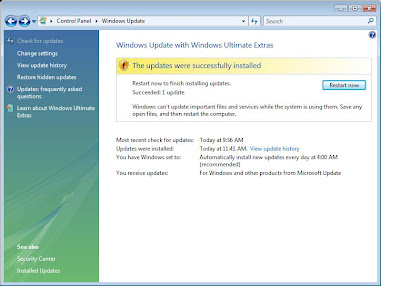
Rule of Thumb for future problems on Vista: Look for and/or remove previously installed Hotfixe and reload to see if it will solve the problem.
This update (KB929777) failed twice before I went searching for the answer. I found this posting on Microsoft's TechNet forums:
http://social.technet.microsoft.com/Forums/en-US/itprovistasecurity/thread/6b9f6a7c-1b91-422f-a803-11440418008f/
The post in the middle with the fewest steps seemed to work for me. Here's the gist:
1: Open up "Control Panel" and navigate your way to "Programs and Features".
2: Click "View installed updates" on the left hand side.
3: Find the update KB929777 and uninstall it.
4: Attempt to install the update again in Windows Update
5: Once successful, restart your PC.
Here's what it looks like after the solution is applied:

Rule of Thumb for future problems on Vista: Look for and/or remove previously installed Hotfixe and reload to see if it will solve the problem.
Subscribe to:
Posts (Atom)