When you go to Adobe's main site and search for the latest Flash installer, you're given a stub in the download, which goes out to grab the rest of the installer when it's launched. Sometimes this doesn't work, especially when the user account currently used does not have administrative rights.
Here's the site to download the full offline version of the installers for IE and all other browsers:
http://www.adobe.com/products/flashplayer/distribution3.html
Showing posts with label updates. Show all posts
Showing posts with label updates. Show all posts
Friday, July 12, 2013

Thursday, July 28, 2011
NEWS: Sniffer hijacks secure traffic from unpatched iPhones
Unpatched iPhones can be exploited even with availability of SSL. One of the methods, published 9 years ago, is so easy that "my mother could actually use this", says Chet Wisniewski, a security researcher with Sophos.
Moral of the story, unless you have iOS 5 with over-the-air-updates, make sure to plug in your iPhone and get it updated.
Moral of the story, unless you have iOS 5 with over-the-air-updates, make sure to plug in your iPhone and get it updated.
Thursday, February 24, 2011
TIPS & TRICKS: Installing Language Packs in Windows 7
Okay there's plenty of postings on instructions for installing language packs in Windows 7. Here's a couple of Microsoft's instructions:
http://support.microsoft.com/kb/972813
http://windows.microsoft.com/en-us/windows7/products/features/language-packs
All these instructions indicate the best way to obtain the language packs are through Microsoft Update that is built-in to Windows 7. These instructions are great, except for one missing step. When you get to the Microsoft Update window on a new machine, there isn't a link for Optional Updates, where the language packs reside.
To get there, you'll need to first click on the link that says "Check online for updates from Microsoft Update". After the machine checks for updates, it will show the link for the Optional Updates.
Hope this helps you save some time. Happy Computing.
http://support.microsoft.com/kb/972813
http://windows.microsoft.com/en-us/windows7/products/features/language-packs
All these instructions indicate the best way to obtain the language packs are through Microsoft Update that is built-in to Windows 7. These instructions are great, except for one missing step. When you get to the Microsoft Update window on a new machine, there isn't a link for Optional Updates, where the language packs reside.
To get there, you'll need to first click on the link that says "Check online for updates from Microsoft Update". After the machine checks for updates, it will show the link for the Optional Updates.
Hope this helps you save some time. Happy Computing.
Saturday, August 01, 2009
RANTS/RAVES: Apple Releases iPhone OS 3.0.1 to Address SMS Security Vulnerability
Rant because it was there in the first place. Rave because of the fast turn around. Here's a MacRumors posting on it:
http://www.macrumors.com/2009/07/31/apple-releases-iphone-os-3-0-1-to-address-sms-security-vulnerability/
http://www.macrumors.com/2009/07/31/apple-releases-iphone-os-3-0-1-to-address-sms-security-vulnerability/
Tuesday, December 30, 2008
TIPS & TRICKS: Windows Update KB929777 Fails with Error 8000FFFF
This is a newly reloaded Windows Vista Ultimate build that was added to our Active Directory, loaded with Sophos Anti-Virus from our Management Console, and all other Windows Updates up to this point applied.
This update (KB929777) failed twice before I went searching for the answer. I found this posting on Microsoft's TechNet forums:
http://social.technet.microsoft.com/Forums/en-US/itprovistasecurity/thread/6b9f6a7c-1b91-422f-a803-11440418008f/
The post in the middle with the fewest steps seemed to work for me. Here's the gist:
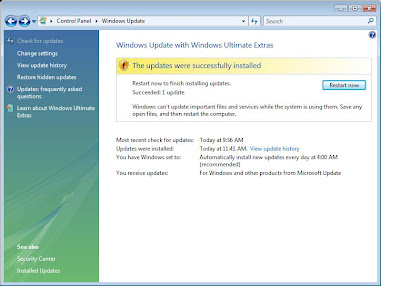
Here's what it looks like after the solution is applied:
Rule of Thumb for future problems on Vista: Look for and/or remove previously installed Hotfixe and reload to see if it will solve the problem.
This update (KB929777) failed twice before I went searching for the answer. I found this posting on Microsoft's TechNet forums:
http://social.technet.microsoft.com/Forums/en-US/itprovistasecurity/thread/6b9f6a7c-1b91-422f-a803-11440418008f/
The post in the middle with the fewest steps seemed to work for me. Here's the gist:
1: Open up "Control Panel" and navigate your way to "Programs and Features".
2: Click "View installed updates" on the left hand side.
3: Find the update KB929777 and uninstall it.
4: Attempt to install the update again in Windows Update
5: Once successful, restart your PC.
Here's what it looks like after the solution is applied:

Rule of Thumb for future problems on Vista: Look for and/or remove previously installed Hotfixe and reload to see if it will solve the problem.
Monday, December 29, 2008
RANTS: Digital Picture Frames Come With Free Viruses
If you've purchased or received a Samsung Digital Picture frame from Amazon, take a look at this posting by Amazon:
http://www.amazon.com/gp/forum/cd/discussion.html?ie=UTF8&cdForum=Fx20DX5GEB7TUX8&cdThread=Tx2LOAXBDR3N47W
This is not the first time this has happened:
http://www.foxnews.com/story/0,2933,337848,00.html?sPage=fnc/scitech/cybersecurity
It won't be the last. I've already heard of these types of things happening with hard drives, which is why I do a wipe of all new hard drives before I deploy.
How To Protect Yourself:
- Always run an anti-virus program on your computer.
- Always keep that anti-virus program updated.
- When purchasing or obtaining anything that may hold data (i.e. digital picture frame, hard drives, USB flash drives, etc.), make sure to, at least, do a virus scan on the device. The better thing to do is to wipe and/or format the device before your first use.
Good luck and happy computing.
http://www.amazon.com/gp/forum/cd/discussion.html?ie=UTF8&cdForum=Fx20DX5GEB7TUX8&cdThread=Tx2LOAXBDR3N47W
This is not the first time this has happened:
http://www.foxnews.com/story/0,2933,337848,00.html?sPage=fnc/scitech/cybersecurity
It won't be the last. I've already heard of these types of things happening with hard drives, which is why I do a wipe of all new hard drives before I deploy.
How To Protect Yourself:
- Always run an anti-virus program on your computer.
- Always keep that anti-virus program updated.
- When purchasing or obtaining anything that may hold data (i.e. digital picture frame, hard drives, USB flash drives, etc.), make sure to, at least, do a virus scan on the device. The better thing to do is to wipe and/or format the device before your first use.
Good luck and happy computing.
Thursday, July 03, 2008
TIPS & TRICKS: Word 2008 Documents Not Opening
Recently, I found that my installation of Word 2008 was not opening documents properly. Specifically, I found after double-clicking on a Word file, especially one residing on a network share, Word would launch normally. But, the only thing that would come up was a new blank document. I would close the new document and the file still wouldn't open. The only way I could get it to open was to go up to File (in Word) > Open.
That was quite annoying and, apparently, some of my users thought so too. Luckily, my boss found a fix. And, even more fortunate, the fix is bundled in the latest update for Office. The version is 12.1.1. Make sure to run your Office updates to get this. There are two ways: 1. launch an Office application and go up to Help > Check for Updates to run the Microsoft AutoUpdate tool; or 2. Go to Library\Application Support\Microsoft\MAU2.0 and launch Microsoft AutoUpdate.
That was quite annoying and, apparently, some of my users thought so too. Luckily, my boss found a fix. And, even more fortunate, the fix is bundled in the latest update for Office. The version is 12.1.1. Make sure to run your Office updates to get this. There are two ways: 1. launch an Office application and go up to Help > Check for Updates to run the Microsoft AutoUpdate tool; or 2. Go to Library\Application Support\Microsoft\MAU2.0 and launch Microsoft AutoUpdate.
Wednesday, January 03, 2007
TIPS & TRICKS: svchost.exe -- application error the instruction at "0x745f2780"
A faculty member went home before the end-of-the-year holiday break with a brand new machine that I installed our software packages on. The machine worked perfectly when it left here. It just came back here today and he reports that the machine receives the following message:
svchost.exe -- application error the instruction at "0x745f2780" reference memory at "0x00000000". the memory could not be 'read'
There was also another message, but this was the pertinent one. As soon as the error message was closed, the machine became unusable. Since it was working just fine before it left my possession, I assumed that he installed something to break the Windows install.
I first tried booting into Safe Mode. It booted with no problems. I then turned off all startup items and booted the machine into normal Windows. Error message still came up. This was going to be a problem with the core OS. Not wanting to waste more time, I searched the web for the error message. The first hit was this [swigartconsulting.blogs.com].
Amazing, that the first hit gave me the solution. Apparently, the problem was corruption in the Windows Update process. The easy solution to try was to turn off Automatic Updates, run Windows Updates (or Microsoft Updates), then turn Automatic Updates back on. There's also a more in-depth fix listed on the website above. However, the easy one worked for me.
svchost.exe -- application error the instruction at "0x745f2780" reference memory at "0x00000000". the memory could not be 'read'
There was also another message, but this was the pertinent one. As soon as the error message was closed, the machine became unusable. Since it was working just fine before it left my possession, I assumed that he installed something to break the Windows install.
I first tried booting into Safe Mode. It booted with no problems. I then turned off all startup items and booted the machine into normal Windows. Error message still came up. This was going to be a problem with the core OS. Not wanting to waste more time, I searched the web for the error message. The first hit was this [swigartconsulting.blogs.com].
Amazing, that the first hit gave me the solution. Apparently, the problem was corruption in the Windows Update process. The easy solution to try was to turn off Automatic Updates, run Windows Updates (or Microsoft Updates), then turn Automatic Updates back on. There's also a more in-depth fix listed on the website above. However, the easy one worked for me.
Subscribe to:
Posts (Atom)