Syncing my iPhone with iTunes on my workstation yielded an error message that said "The iPhone cannot be synced. An unexpected error occurred (1150)." The only way I could figure out a way around this error was to disable all restrictions on the iPhone itself. I tried disabling individual restrictions, but nothing worked. Only completely disabling all restrictions helped the sync complete.
Oh, it also helps to unplug the sync cable if you have it plugged in after disabling all restrictions. Unplugging and replugging the iPhone to the computer seems to tell iTunes that changes were actually made.
Hope that helps you.
Showing posts with label iPhone. Show all posts
Showing posts with label iPhone. Show all posts
Friday, October 26, 2012

Monday, April 23, 2012
TIPS & TRICKS: Recalibrate a Sticky iPhone Home Button
Didn't know about this trick until today. Apparently, if the home button on the iPhone is sticking or not responding, recalibrating it could help to get it working again. Here are the steps:
- Click on a native iOS application (i.e. Stocks, Email, Messages, etc.).
- Push and hold the power button on top until the "slide to power off" screen appears.
- Let go of the power button.
- Push and hold the home button until the "slide to power off" screen disappears and let go of the home button.
The home button should be recalibrated now.
Hope this helps someone.
Monday, March 26, 2012
RANTS & RAVES: Reasons to Upgrade
I've got an iPhone 3G. You read that right, iPhone 3G. It's as slow as molasses. But, I've been holding off on upgrading for several reasons. First, I'd like to think that I'm environmentally conscious by taking longer to upgrade the device. Second, I think that the device has some life left in it. It does the basics for me. I just can't ask it to do more, which brings me to this post. Here's an ongoing list of the reasons why I really need to upgrade:
- Can't rotate photos. I took a photo of a sheet of paper, instead of photo copying it. Problem is I took it in landscape mode and I am unable to keep it in landscape view to keep the text upright. When the phone is in landscape the photo rotates to portrait mode and the text is sideways. My neck hurts.
- Photos are very low in quality. I'm capturing precious moments in very low quality. Great for hiding those pimples.
- No front facing camera. Can't Skype or Facetime.
Thursday, July 28, 2011
NEWS: Sniffer hijacks secure traffic from unpatched iPhones
Unpatched iPhones can be exploited even with availability of SSL. One of the methods, published 9 years ago, is so easy that "my mother could actually use this", says Chet Wisniewski, a security researcher with Sophos.
Moral of the story, unless you have iOS 5 with over-the-air-updates, make sure to plug in your iPhone and get it updated.
Moral of the story, unless you have iOS 5 with over-the-air-updates, make sure to plug in your iPhone and get it updated.
Thursday, January 07, 2010
RANTS: iPhone WiFi Problem
A few months back, I was asked to troubleshoot a wifi problem on an iPhone 3G 8GB. The problem was that the wifi would be able to see the wireless networks in the area. However, when attempting to connect to a network, the iPhone would present a message saying that it was unable to connect to the network. This behavior exhibited itself when connecting to any wireless network, whether the network required authentication or not. After surveying the phone, duplicating the problem and asking the user what he had done just prior to this discovery, I briefly pondered what could cause this problem. I came to the possibility that some application installed on the iPhone caused the wifi problem. Based on what the user told me, I uninstalled a couple of apps he had installed an the problem vanished. It worked!
That was a few months ago. The user returned today and showed me the same problem. We think the problem returned this time because he restored his iPhone from an old backup, which could have restored the old app. Unfortunately, I don't remember which app was the problem. I've spent the afternoon trying to figure out which app while I was searching online for an answer. I came across the following:
http://discussions.apple.com/thread.jspa?threadID=2044754&start=0&tstart=0
http://www.everythingicafe.com/forum/archive/index.php/t-58045.html
The first link shows that it's a pretty widespread problem. In fact, this is the first time I've seen a discussion forum post with over 100 pages of posts. The second link has more advanced content about the potential problem, but still no real solution yet.
I'm still working on the app angle. Hopefully, I'll be able to figure out if it is indeed an app that is causing the problem. I didn't read through the 100+ pages of posts in the Apple Support page. But, in reading through many pages of posts, I don't see any indication that anyone has approached this problem from this angle. I frequently read that people restored their phones from backups after doing hard resets or getting a whole new phone. What if this restoration process just brought the problem back? I'll post more as I find out more.
Happy Computing.
That was a few months ago. The user returned today and showed me the same problem. We think the problem returned this time because he restored his iPhone from an old backup, which could have restored the old app. Unfortunately, I don't remember which app was the problem. I've spent the afternoon trying to figure out which app while I was searching online for an answer. I came across the following:
http://discussions.apple.com/thread.jspa?threadID=2044754&start=0&tstart=0
http://www.everythingicafe.com/forum/archive/index.php/t-58045.html
The first link shows that it's a pretty widespread problem. In fact, this is the first time I've seen a discussion forum post with over 100 pages of posts. The second link has more advanced content about the potential problem, but still no real solution yet.
I'm still working on the app angle. Hopefully, I'll be able to figure out if it is indeed an app that is causing the problem. I didn't read through the 100+ pages of posts in the Apple Support page. But, in reading through many pages of posts, I don't see any indication that anyone has approached this problem from this angle. I frequently read that people restored their phones from backups after doing hard resets or getting a whole new phone. What if this restoration process just brought the problem back? I'll post more as I find out more.
Happy Computing.
Saturday, October 03, 2009
RANTS: iPhone Network Issues Since OS3.1 Update
I've been using my 3G iPhone for over a year now. I still field occasional questions about my take on the device, and, I still hesitate with my answer. I wholeheartedly admit that I've been able to do lots of things that I could only dream of doing with a basic phone and a separate wifi-enabled PDA device, like type out this post, look up quick information on the web, and check/reply to urgent email.
Now that I've become dependent on the iPhone, any interruption could cause some frustrations. The latest problem is the lack of connectivity. Basically, unbeknownst to me, the iPhone will lose it's ability to make/receive phone calls, connect to the web over 3G, and send/receive email. It's not until I try to make a phone call that I figure out connectivity has been lost. This means that if someone attempts to call or text, the iPhone does not ring or beep.
Restarting the iPhone will reconnect it to the network. Of course, this is cumbersome, to say the least, not to mention the potential missed calls and texts. I also spent 20 minutes with an AT&T CSR to troubleshoot the problem and the result there was to try replacing the SIM card. Of course, I went online to look for more answers. I found this thread on Apple's website:
http://discussions.apple.com/thread.jspa?threadID=2168883&start=0&tstart=0
It's quite probable that the problem is the latest upgrade to OS 3.1, which I did recently. As I reflect on it, these problems only seemed to have started to occur after the upgrade. The fix that seems to work for everyone is to turn off 3G. I haven't tried that yet, but will do so soon. Let's hope Apple figures this one out soon and posts a fix.
UPDATE, 10/8/2009:
Plugged my iPhone in to sync and found this message:

The most useful to me was the second bullet point that this update fixes "intermittent issue that may interrupt cellular network services until restart."
If this works properly, then it's another great piece of evidence that Apple has the resources to both listen to their customers and resolve their issues in a timely manner. Now if AT&T could get their act together, I would never need to think about switching to Verizon again.
Hope this helps you. Happy computing.
Now that I've become dependent on the iPhone, any interruption could cause some frustrations. The latest problem is the lack of connectivity. Basically, unbeknownst to me, the iPhone will lose it's ability to make/receive phone calls, connect to the web over 3G, and send/receive email. It's not until I try to make a phone call that I figure out connectivity has been lost. This means that if someone attempts to call or text, the iPhone does not ring or beep.
Restarting the iPhone will reconnect it to the network. Of course, this is cumbersome, to say the least, not to mention the potential missed calls and texts. I also spent 20 minutes with an AT&T CSR to troubleshoot the problem and the result there was to try replacing the SIM card. Of course, I went online to look for more answers. I found this thread on Apple's website:
http://discussions.apple.com/thread.jspa?threadID=2168883&start=0&tstart=0
It's quite probable that the problem is the latest upgrade to OS 3.1, which I did recently. As I reflect on it, these problems only seemed to have started to occur after the upgrade. The fix that seems to work for everyone is to turn off 3G. I haven't tried that yet, but will do so soon. Let's hope Apple figures this one out soon and posts a fix.
UPDATE, 10/8/2009:
Plugged my iPhone in to sync and found this message:

The most useful to me was the second bullet point that this update fixes "intermittent issue that may interrupt cellular network services until restart."
If this works properly, then it's another great piece of evidence that Apple has the resources to both listen to their customers and resolve their issues in a timely manner. Now if AT&T could get their act together, I would never need to think about switching to Verizon again.
Hope this helps you. Happy computing.
Saturday, August 01, 2009
RANTS/RAVES: Apple Releases iPhone OS 3.0.1 to Address SMS Security Vulnerability
Rant because it was there in the first place. Rave because of the fast turn around. Here's a MacRumors posting on it:
http://www.macrumors.com/2009/07/31/apple-releases-iphone-os-3-0-1-to-address-sms-security-vulnerability/
http://www.macrumors.com/2009/07/31/apple-releases-iphone-os-3-0-1-to-address-sms-security-vulnerability/
Friday, June 19, 2009
RAVES: Continue using original iPhone without cellular service
It's hard not to be an Apple enthusiast, when they seem to think of things ahead of time. For those of you who are upgrading from your original iPhone to iPhone 3GS, you'll be happy to know that your original iPhone is still usable after you've moved your AT&T cellular service over to the new iPhone. Here's the instructions from Apple:
http://support.apple.com/kb/HT3406
Good luck and happy computing.
http://support.apple.com/kb/HT3406
Good luck and happy computing.
Wednesday, June 17, 2009
TIPS & TRICKS: How To Stop iTunes From Launching When iPhone Is Plugged In
The iPhone battery leaves me wanting more. Some day we won't even worry about battery life. For now, I find that I have to charge pretty regularly. I don't think I can get through a full day of pretty regular usage without charging. Because of the short battery life, I always keep the charging cable with me. However, I don't keep the USB to AC adapter with me. Usually, I'm near a computer with a USB port to help charge the iPhone.
In this process, one minor annoyance is that iTunes insists on launching when the iPhone is plugged in. Since, I don't always plug into the same machine that I normally sync with, I wanted to find a way to keep iTunes from launching when I plug into other machines for charging purposes. Googled it and couldn't find a quick answer.
Here's the simple way to do it. Remove the iTunes Helper application from running on startup. In Mac OS X, go to System Preferences > Accounts > Your User Account > Login Items and remove the iTunes Helper Application. The next time you login to your profile and plug in your iPhone, iTunes will not launch. I haven't tried it on a Windows machine yet, but I know that there is an iTunes Helper Application there too. Just remove it and iTunes will not launch.
Hope this helps with this slightly annoying problem. Happy computing.
In this process, one minor annoyance is that iTunes insists on launching when the iPhone is plugged in. Since, I don't always plug into the same machine that I normally sync with, I wanted to find a way to keep iTunes from launching when I plug into other machines for charging purposes. Googled it and couldn't find a quick answer.
Here's the simple way to do it. Remove the iTunes Helper application from running on startup. In Mac OS X, go to System Preferences > Accounts > Your User Account > Login Items and remove the iTunes Helper Application. The next time you login to your profile and plug in your iPhone, iTunes will not launch. I haven't tried it on a Windows machine yet, but I know that there is an iTunes Helper Application there too. Just remove it and iTunes will not launch.
Hope this helps with this slightly annoying problem. Happy computing.
Thursday, November 13, 2008
RANTS: iPhone Bug Involving Unnecessary Deleting
Awhile back, I was typing on the iPhone on the a note in the included Notes app. I deleted something and found that instead of just deleting the few characters necessary, the cursor went and deleted a bunch of text all at once. I chalked it up to the sensitivity of the screen. The other day, I was doing exactly the same thing, deleting some text. I lost the entire document as a result. I went and searched for other people with the problem and came across this thread on the Apple Discussions area:
http://discussions.apple.com/thread.jspa?messageID=7966661�
I was able to reproduce the problem every time. Anyone else having this problem?
http://discussions.apple.com/thread.jspa?messageID=7966661�
I was able to reproduce the problem every time. Anyone else having this problem?
Sunday, October 12, 2008
RANTS: Belkin TuneCast for iPhone 3G
Not sure if this really qualifies as a rant. But, I picked up a Belkin TuneCast today to use on the iPhone 3G, since my beloved Monster FM transmitter for my 3G iPod won't charge the iPhone in the car, though the Monster iCarPlay Wireless transmits well enough.
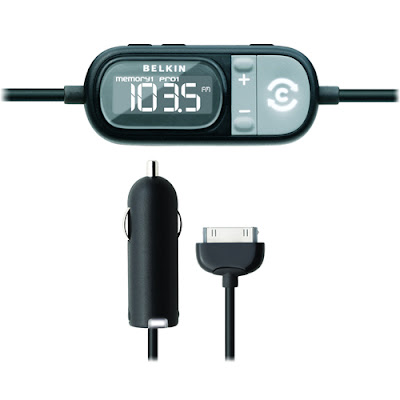
I don't have an auxiliary port or working tape deck in my car. Therefore, FM transmitter is the only way to go without making any drastic changes to the sound system in the car. I was also hoping that this method would give the flexibility to use this in any car (i.e. rentals). I have the Monster iCarPlay Wireless and I love that thing. Nothing is as good as a direct connection, but it's as good as it'll get for an FM transmitter. The sole reason I went out to buy this Belkin one is because the iCarPlay won't charge my iPhone in the car. I find it hard to believe that Apple couldn't make it Firewire devices charge just like USB devices. But, that's a rant for another day.
Plugging it all together for the first time, I immediately received the message that the TuneCast is not made for iPhone and asked if I wanted to switch to Airplane Mode. I switched to Airplane Mode. I only played music briefly in the car just to test it out. The quality of the sound is subpar compared to the iCarPlay. I get some static if the iPhone or the tuner to the TuneCast is moved around. This doesn't happen with the older iCarPlay. Most important for me is that the iPhone charges. However, I'm going to guess that the sound quality is going to be bad enough for me to return it. I really only use it on long trips and many rental cars have auxiliary ports now. This means that I really only need a car charger, which is a much cheaper alternative to this device.
I understand one problem plaguing any FM transmitter for the iPhone. The interference from the phone part of it will interfere with the FM tranmitter portion of it. However, when I get static even in Airplane Mode I don't think this is acceptable. I read somewhere that there will never be a perfect FM transmitter because they all need to adhere to limits set forth by the FCC that govern how much juice these types of devices are allowed to broadcast. There's never going to be enough power to override any outside signals, which is what a good device really needs to be able to do.
In the end, I can't recommend this product, even if it might be the best one out there. For now, there just isn't a good FM transmitter solution for the iPhone. I'm going to venture out and guess that there may never be a solid solution since many cars will have auxiliary ports now. Here's to hoping.

I don't have an auxiliary port or working tape deck in my car. Therefore, FM transmitter is the only way to go without making any drastic changes to the sound system in the car. I was also hoping that this method would give the flexibility to use this in any car (i.e. rentals). I have the Monster iCarPlay Wireless and I love that thing. Nothing is as good as a direct connection, but it's as good as it'll get for an FM transmitter. The sole reason I went out to buy this Belkin one is because the iCarPlay won't charge my iPhone in the car. I find it hard to believe that Apple couldn't make it Firewire devices charge just like USB devices. But, that's a rant for another day.
Plugging it all together for the first time, I immediately received the message that the TuneCast is not made for iPhone and asked if I wanted to switch to Airplane Mode. I switched to Airplane Mode. I only played music briefly in the car just to test it out. The quality of the sound is subpar compared to the iCarPlay. I get some static if the iPhone or the tuner to the TuneCast is moved around. This doesn't happen with the older iCarPlay. Most important for me is that the iPhone charges. However, I'm going to guess that the sound quality is going to be bad enough for me to return it. I really only use it on long trips and many rental cars have auxiliary ports now. This means that I really only need a car charger, which is a much cheaper alternative to this device.
I understand one problem plaguing any FM transmitter for the iPhone. The interference from the phone part of it will interfere with the FM tranmitter portion of it. However, when I get static even in Airplane Mode I don't think this is acceptable. I read somewhere that there will never be a perfect FM transmitter because they all need to adhere to limits set forth by the FCC that govern how much juice these types of devices are allowed to broadcast. There's never going to be enough power to override any outside signals, which is what a good device really needs to be able to do.
In the end, I can't recommend this product, even if it might be the best one out there. For now, there just isn't a good FM transmitter solution for the iPhone. I'm going to venture out and guess that there may never be a solid solution since many cars will have auxiliary ports now. Here's to hoping.
Friday, September 19, 2008
RANTS: iPhone 3G USB Power Adapter Recall
http://www.apple.com/support/usbadapter/exchangeprogram/
Anyone else have a problem? Is Apple quality suffering because they are getting too big?
Make sure to get yours replaced. You can do it at an Apple Store starting Oct. 10 or online. For the online process, you can go here:
https://supportform.apple.com/200809/
Being as paranoid as I am, I'll probably go the store to do it so I don't have to put my address in yet another form, even though I know I'll likely be standing in line on Oct. 10.
Anyone else have a problem? Is Apple quality suffering because they are getting too big?
Make sure to get yours replaced. You can do it at an Apple Store starting Oct. 10 or online. For the online process, you can go here:
https://supportform.apple.com/200809/
Being as paranoid as I am, I'll probably go the store to do it so I don't have to put my address in yet another form, even though I know I'll likely be standing in line on Oct. 10.
Tuesday, August 12, 2008
RAVES / RANTS : iPhone, First Impressions
Here are my first impressions on the iPhone 3G:
Good:
- Synced with local contacts and calendar on Outlook. Since I kept my contacts in Outlook updated and organized, this was probably the best improvement over a separate PDA and phone combination.
- GPS is not bad for a phone. Dedicated devices are still better.
- Typing on the on-screen keyboard is better than on my old iPaq.
- The widescreen mode helps a lot when typing.
- Basic web browsing is fine. I've found lots of pages that are optimized for mobile devices and some specifically for iPhone.
- Being able to customize the home screen was a good feature.
- Conversations in SMS works well (i.e. being able to view entire conversation with a particular person in one screen as opposed to hunting for particular messages from a person) and is useful.
- Secondary reminder in calendar items is useful, especially since reminders can't be snoozed.
- Visual voicemail saves from having to listen to many messages to get to the the one you want.
- Apps store has potential.
Bad:
- Contacts and calendar items don't retain any of the categories from Outlook.
- Widescreen mode typing not available in all areas in iPhone.
- Battery is terrible. I run with 3G and wi-fi off most of the time and it's still won't make it through 2 days of normal usage.
- Anything more complicated than basic web browsing, I needed to go to computer.
- Can't do any basic editing of Excel/Word documents. Sometimes, I just need a basic spreadsheet to keep tabs of things while I'm on the go. I've been doing this fine on my 6 year old iPaq.
- Reminders can't be snoozed.
- From Apps store, I haven't found any terribly useful, yet stable apps. Would love to see a spreadsheet app.
Good:
- Synced with local contacts and calendar on Outlook. Since I kept my contacts in Outlook updated and organized, this was probably the best improvement over a separate PDA and phone combination.
- GPS is not bad for a phone. Dedicated devices are still better.
- Typing on the on-screen keyboard is better than on my old iPaq.
- The widescreen mode helps a lot when typing.
- Basic web browsing is fine. I've found lots of pages that are optimized for mobile devices and some specifically for iPhone.
- Being able to customize the home screen was a good feature.
- Conversations in SMS works well (i.e. being able to view entire conversation with a particular person in one screen as opposed to hunting for particular messages from a person) and is useful.
- Secondary reminder in calendar items is useful, especially since reminders can't be snoozed.
- Visual voicemail saves from having to listen to many messages to get to the the one you want.
- Apps store has potential.
Bad:
- Contacts and calendar items don't retain any of the categories from Outlook.
- Widescreen mode typing not available in all areas in iPhone.
- Battery is terrible. I run with 3G and wi-fi off most of the time and it's still won't make it through 2 days of normal usage.
- Anything more complicated than basic web browsing, I needed to go to computer.
- Can't do any basic editing of Excel/Word documents. Sometimes, I just need a basic spreadsheet to keep tabs of things while I'm on the go. I've been doing this fine on my 6 year old iPaq.
- Reminders can't be snoozed.
- From Apps store, I haven't found any terribly useful, yet stable apps. Would love to see a spreadsheet app.
Monday, August 04, 2008
RANTS: iShieldz iPhone 3G case protection
First of all, never buy anything in a hurry. More often times than not, I get the short end of the stick. This was definitely the case with the case protection set I purchased. The purchase was made at a kiosk called i Play Tunes UTC (V-Tex Global INC), which is right in front of the Westfield UTC shopping Center in La Jolla, CA. The product is the iPhone 3G Shieldz (ishieldz.com).
Application on the front of the screen was a breeze, though I did have a bubble that didn't seem to want to go away. My first impression was that the screen was not crystal clear at all. It seemed hazy and was definitely not as smooth to the touch as the original screen. Installation on the back was hopeless. Most of the back went down just as smooth as the front. The problem was the edges. The iPhone 3G has much more rounded edges and the edges of the film just did not want to stay down at all, almost like it wasn't specifically made for the 3G model. Also, the coverage of the back of the screen, as well as a bit of the front, leaves some areas still exposed.
Overall, I would definitely stay away from this product, especially when I ended up paying almost double for the product, when the website shows the price as almost half the price. Again, do not make purchases when you're in a hurry, especially this product. I'm going to have to try to go back to the kiosk to see if I can remedy this problem, even though the receipt says "all sales are final". Let's see how good these people really are with standing by the products they sell and taking care of the customer.
UPDATE: I was finally able to get the corners down on the back film. However, there are a ton of blemishes. In first usage after letting it sit overnight, the screen quality has degraded quite a bit over not having the screen cover. Here's a picture:

Notice the bottom of the picture. Those blemishes show up all throughout the screen when light hits it and when the device is turned on. According to the manufacturers, I'm supposed to wait a day or two. But, I highly doubt that will go away with time.
Also, my fingers don't move over the screen cover nearly as smoothly as the original screen. One positive note, is that the lack of smoothness creates a less slippery device overall. It basically adds a bit of grip to the device, which means it's less likely to slip out of my hand in normal usage.
I still have not changed my stance on this product. It's not worth the $24.99 on the website, or the $40+ that I paid for it at the mall. I may still go back to try to salvage something out of this purchase, but I may just leave this on until it degrades and I need to add a new one. Good luck.
Application on the front of the screen was a breeze, though I did have a bubble that didn't seem to want to go away. My first impression was that the screen was not crystal clear at all. It seemed hazy and was definitely not as smooth to the touch as the original screen. Installation on the back was hopeless. Most of the back went down just as smooth as the front. The problem was the edges. The iPhone 3G has much more rounded edges and the edges of the film just did not want to stay down at all, almost like it wasn't specifically made for the 3G model. Also, the coverage of the back of the screen, as well as a bit of the front, leaves some areas still exposed.
Overall, I would definitely stay away from this product, especially when I ended up paying almost double for the product, when the website shows the price as almost half the price. Again, do not make purchases when you're in a hurry, especially this product. I'm going to have to try to go back to the kiosk to see if I can remedy this problem, even though the receipt says "all sales are final". Let's see how good these people really are with standing by the products they sell and taking care of the customer.
UPDATE: I was finally able to get the corners down on the back film. However, there are a ton of blemishes. In first usage after letting it sit overnight, the screen quality has degraded quite a bit over not having the screen cover. Here's a picture:

Notice the bottom of the picture. Those blemishes show up all throughout the screen when light hits it and when the device is turned on. According to the manufacturers, I'm supposed to wait a day or two. But, I highly doubt that will go away with time.
Also, my fingers don't move over the screen cover nearly as smoothly as the original screen. One positive note, is that the lack of smoothness creates a less slippery device overall. It basically adds a bit of grip to the device, which means it's less likely to slip out of my hand in normal usage.
I still have not changed my stance on this product. It's not worth the $24.99 on the website, or the $40+ that I paid for it at the mall. I may still go back to try to salvage something out of this purchase, but I may just leave this on until it degrades and I need to add a new one. Good luck.
Subscribe to:
Posts (Atom)